
Test it. Check it. Keep monitoring it.
- 10k free credits
- No card
Test your real prompt on many models, check the answers against your own rule, monitor them for changes, and explore what wins. Pick a feature to see how it works.
Use cases what teams use it for
Two moments: before you build, and again when the API bill grows.
Before you build

Pick the model for a new feature
Find the cheapest model that passes your rule, before you integrate a provider.

Price your AI feature
See the real cost per answer and per 1M runs, then set your price and margin.

Choose a model for each agent step
Test every step as one workflow and give each step its own model.
When the bill grows

Cut the cost of a step you run
Put your current model against cheaper ones and see the saving in dollars.

Have a backup from another provider
Find a model from a second provider that passes the same rule.

Know when your model changes
Get told when it gets more expensive, slower or answers differently.
Works for data extraction, classification, support replies, summaries, translation and more.
Test how models answer your prompt
Write the prompt once and run it on the models you pick: one test, a chat, or a workflow of up to 10 tests.
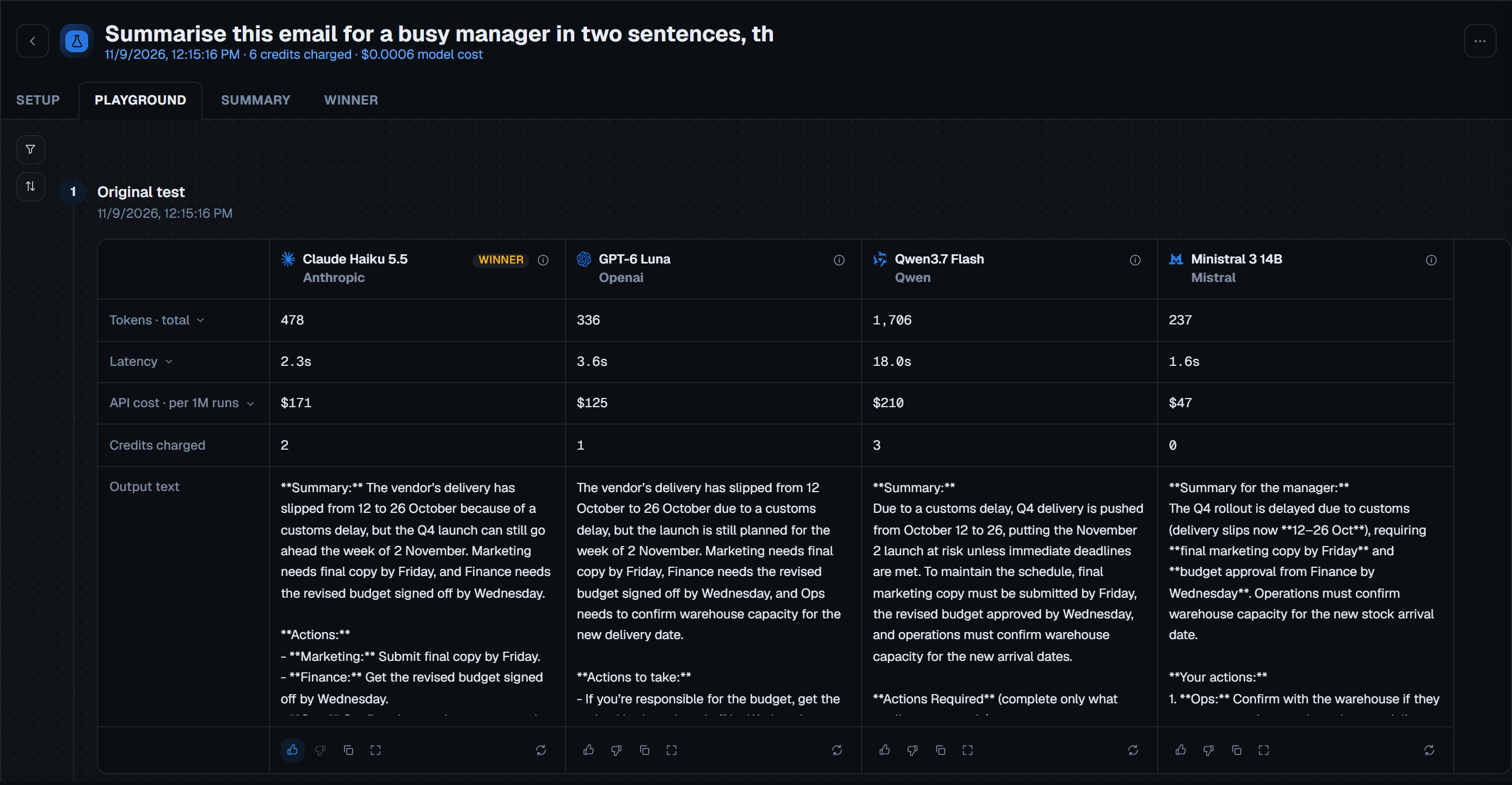
Check whether the answer holds up
Judge the answers against your own rule, repeat a test to see how much it varies, and see what switching would save.
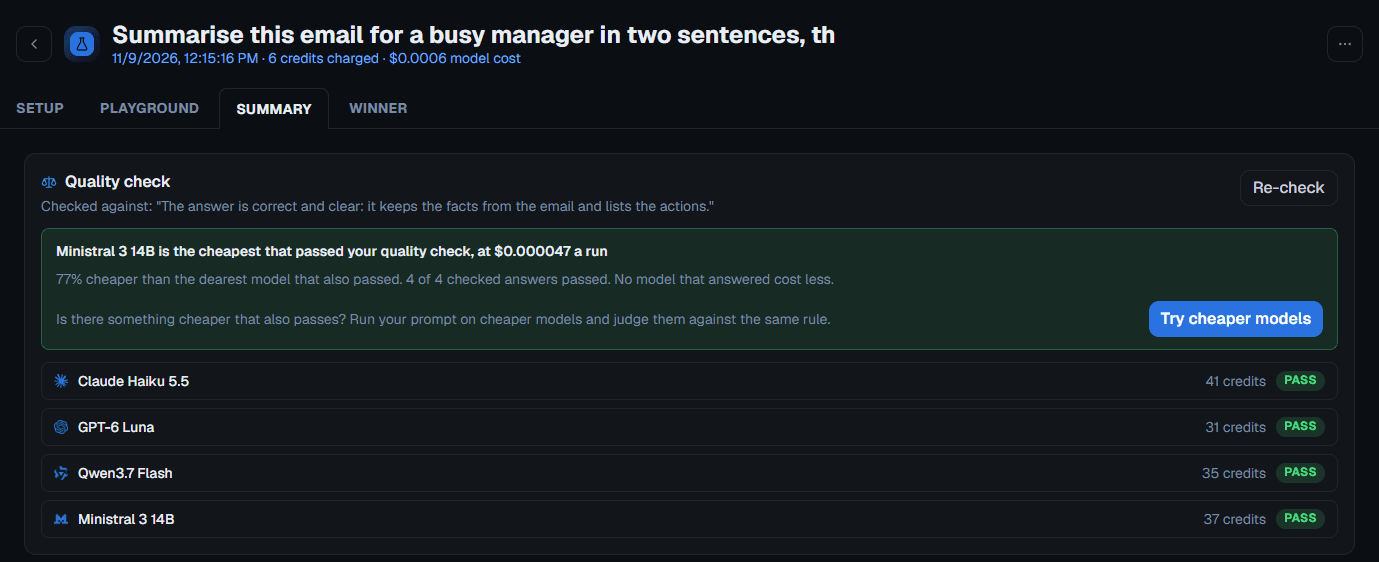
Quality check
Write a pass rule. Judge models mark every answer, and the cheapest that passed comes first.
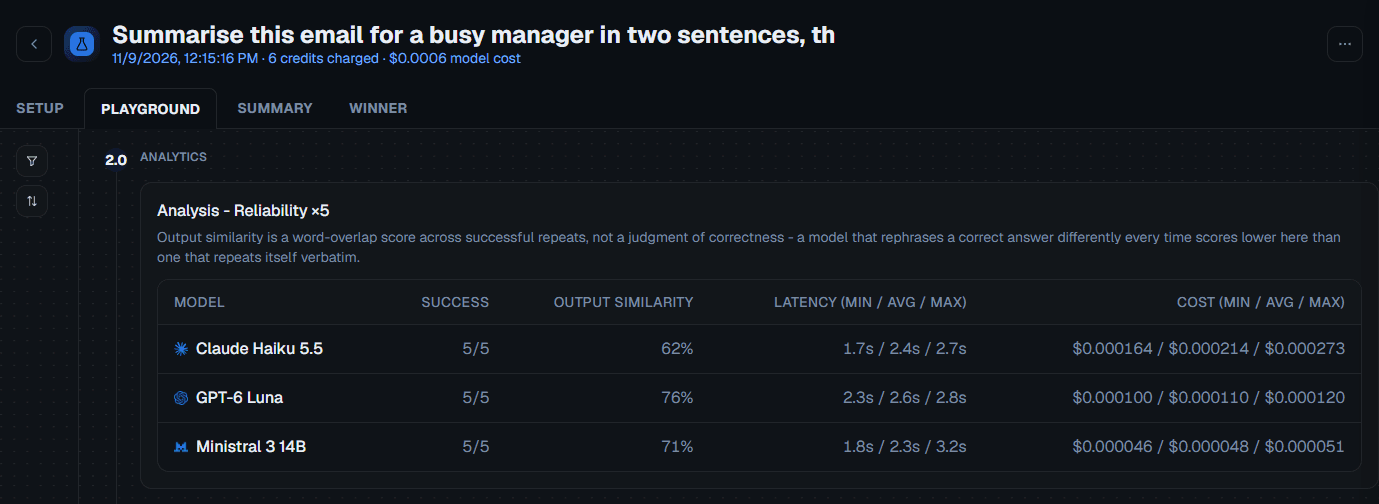
Reliability check
Repeat a test 2, 5 or 10 times to see how much the answers, speed and cost vary.
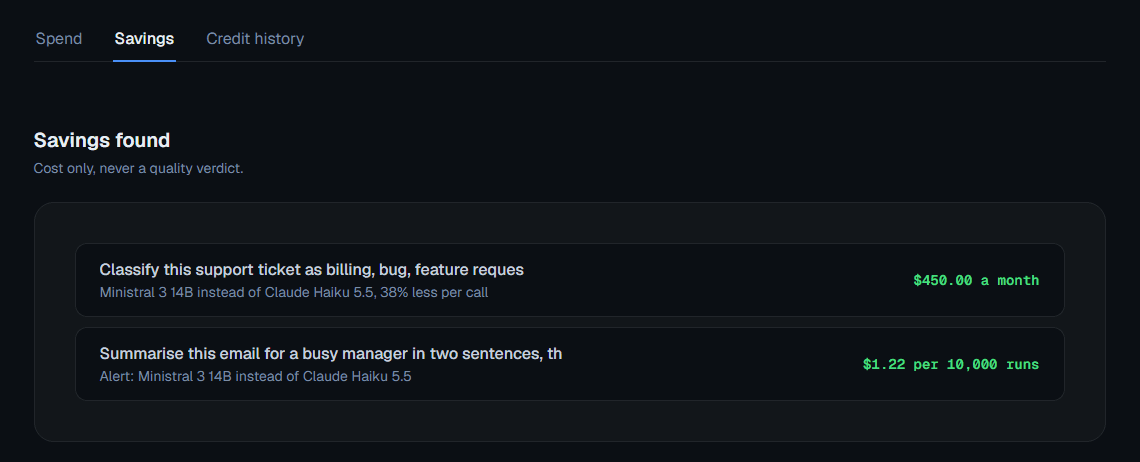
Savings check
Tell it the model you use today and your monthly bill, and see what each alternative would cost.
Monitor when something changes
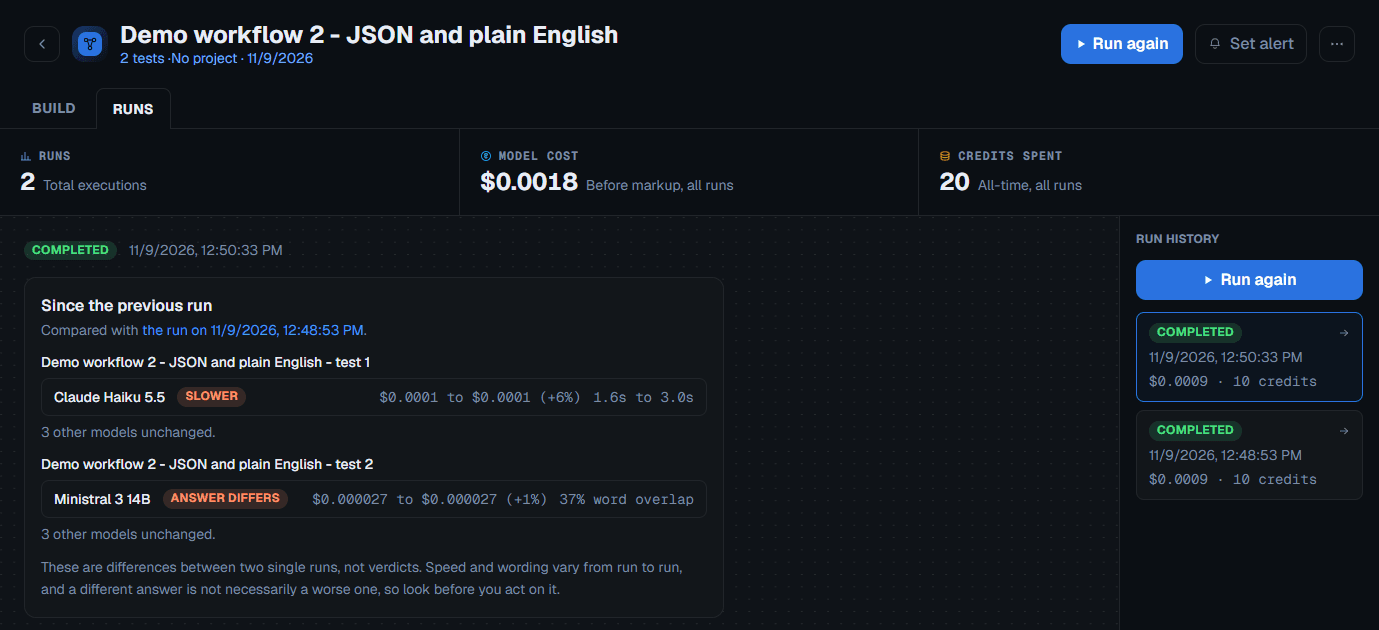
Alerts keep testing for you, so a price rise, a slower model or a changed answer does not wait for the next invoice.
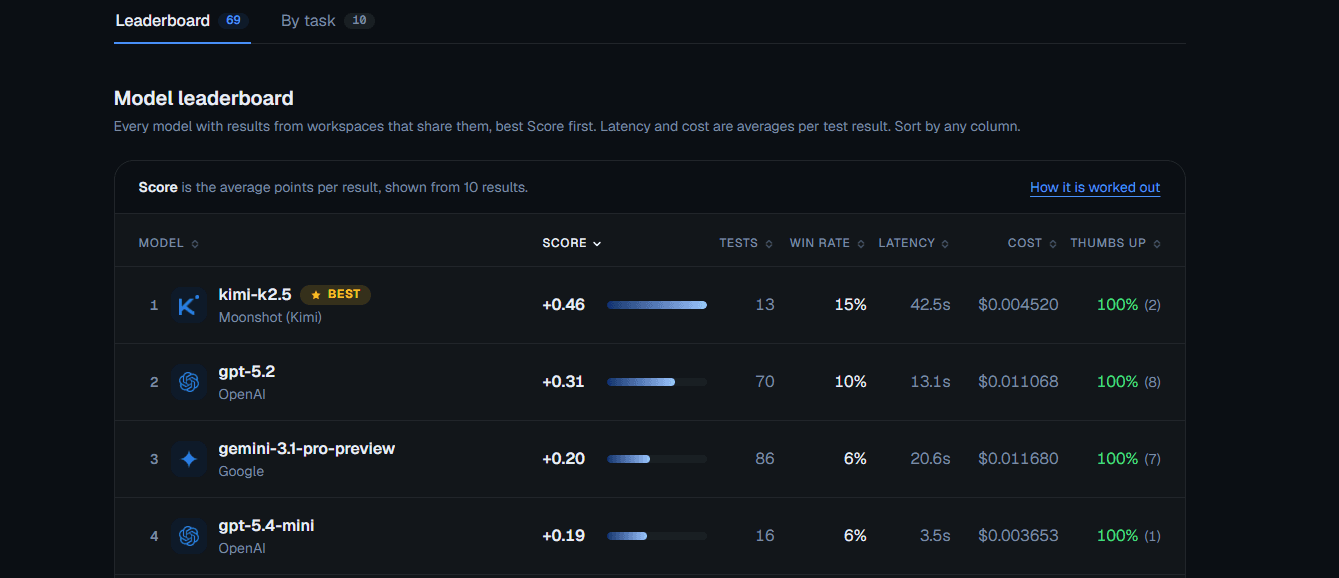
Explore what is out there and what wins
Every active model with its prices, and benchmarks from the accounts that share their results.


Manage the account side
The parts that keep your tests, spend and help in one place.
Home dashboard and analytics
See your latest tests, recent activity and alerts on Home, and where your credits go on Analytics.
Projects
Group related tests and workflows so they are easy to find later.
Credits, billing and spend caps
Top up credits, manage PRO, and set a spend cap per alert check or workflow run.
Help, docs and status
Read how every feature works, what it costs and where your prompt goes.
Nine providers, tested the same way
50+ models from nine providers, with new ones added within days of release. Every model is called the same way on the same prompt, so no provider gets a head start.









 Claude Opus 4.6AnthropicClaude Sonnet 5Anthropic
 Gemini 3.1 Pro PreviewGoogleGemini 3.1 Flash LiteGoogleClaude Sonnet 5.5Anthropic
 GPT-5.5OpenAI
 Grok 4.3xAI
 DeepSeek V4.1 FlashDeepSeek
 Mistral Small 4Mistral
What is different here
Trackers tell you that you are overpaying. Benchmarks tell you how models did on someone else's prompts. This tells you what to switch to, tested on your prompt and checked against your rule.
| Feature | Test AI models | Other testing tools | Benchmark platforms | Manual testing |
|---|---|---|---|---|
| Test your own prompts | Yes | Yes | - | Yes |
| Quality check against your own rule | Yes | Some tools | - | Manual only |
| Real API calls | Yes | Yes | - | Yes |
| Exact cost of every call | Yes | Some show costs | - | Can be implemented |
| Switching with proof | Test first, alerts after you switch | Varies by tool | Research only | Yes |
| Time to first result | About a minute, no setup | Varies by tool | Instant comparison | Slow: one model at a time |
| API keys | No API keys | Varies by tool | No API keys | Need 9+ accounts |
| What it costs | 10,000 credits on signup, then pay as you go, PRO optional | Paid tiers or self-hosted | Free | A paid account with each provider |

Know where your prompt goes before you run it
Your prompt goes to the models you pick. Two things also see it: the task label, sent once to Anthropic (or OpenAI as a fallback), and the judge models if you run a quality check. Prompts and answers are kept until you delete them, hosted in Frankfurt, and each account only sees its own data.
Read the privacy detailsCheck it for yourself

Benchmarks
Which model wins which kind of task, from the accounts that share their results. In the app, once you sign up.
How Benchmarks work (opens in a new tab)
The docs
How every feature works, what it costs and where your prompt goes, written for people who read before they sign up.
Read the docs (opens in a new tab)What we're building next
Building in public - shipping features teams ask for most.
Smart alerts
BuiltRe-run a test or workflow on a schedule and get an email when cost, speed or the answer changes.
Quality check (LLM-as-judge)
BuiltWrite a pass rule in plain words and a panel of judge models marks each answer pass, fail or uncertain.
API access
PlannedRun tests and read results programmatically from your own code and pipelines.
MCP access
PlannedConnect Test AI models to AI assistants and agents through an MCP server.
New model alerts
PlannedGet an email when a new model is added to the platform.
System prompts
PlannedTest and compare system prompt variants across models on the same workload.
Quality regression checks
PlannedRun the quality check automatically on scheduled alerts to catch drift when you switch models.

Find the cheaper model before your next invoice
- 10k free credits
- No card
- No API keys