
Compare test
Compare AI models side by side. One prompt, every model you pick.
- 10k free credits
- No card
Paste a production prompt, pick your models and run them in parallel. Every answer comes back side by side with token counts, speed and cost.
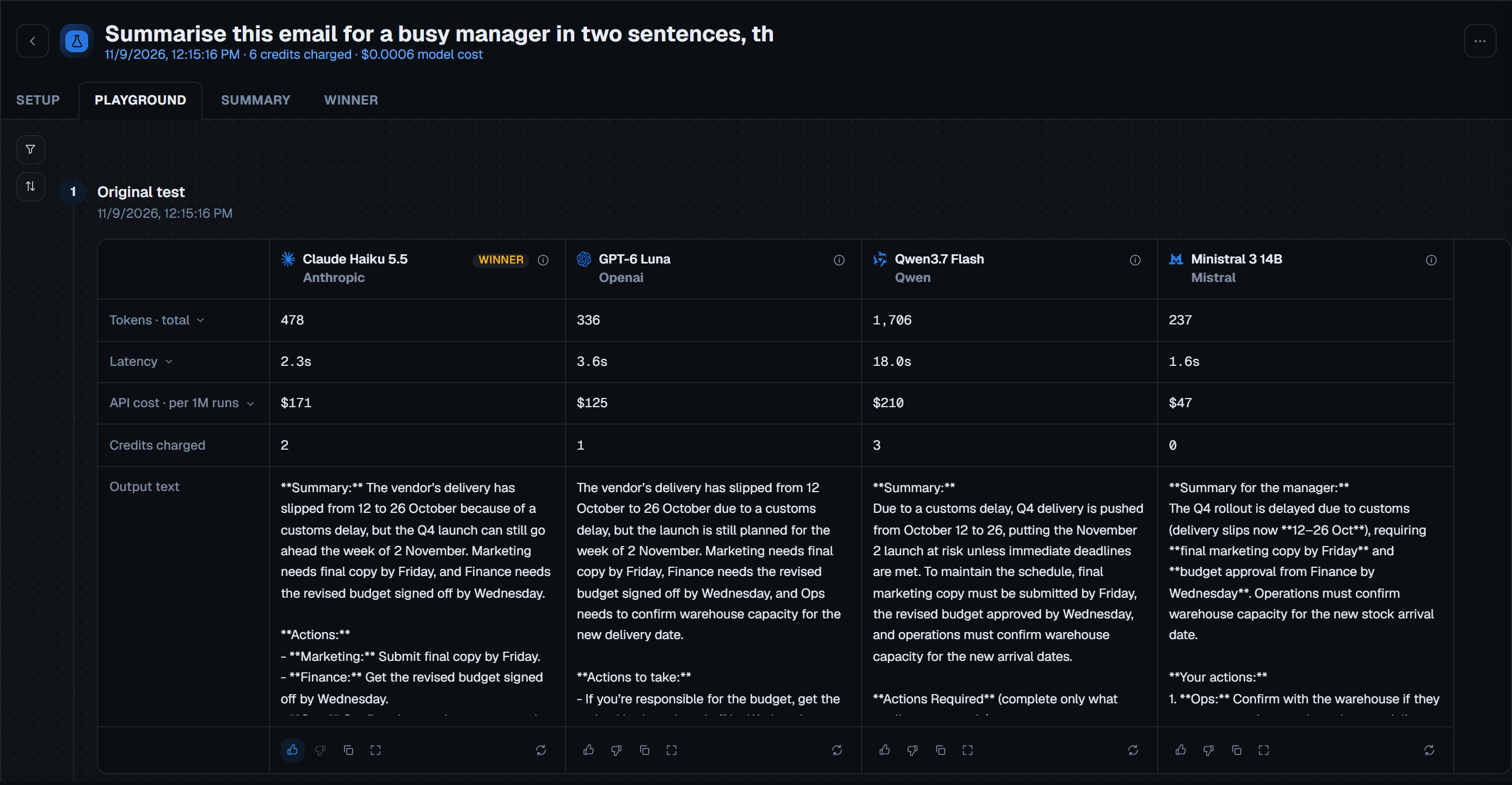
How it works in three steps
From your prompt to every model's answer, side by side.
Write the prompt
Type it, start from a generated example, or have a model tidy it up first. You can also pull in text from a .docx, .txt or .md file.
Pick the models
Choose up to 10 models, or 20 on PRO. You see the credits needed to start before anything runs.
Read the answers side by side
Every answer comes back with its cost, speed and tokens, and the Summary tab sorts them all in one table.
What you get from one run
Text, images and PDFs
Attach an image or a PDF and compare vision models. The model picker only offers models that can read it, and a PDF over 20 pages lets you choose which pages to send.
An AI summary and a winner
Once two results are in, an AI summary can read them and recommend a model. When you have decided, mark a winner. That never re-runs or re-bills anything.

Adjust parameters
Set reasoning effort, system prompt, max tokens, temperature and Top P before you run.

Real API calls
Every answer comes from a live call to the model's API, never a cached result.

Run it again with changes
The Setup tab keeps what you ran, so you can change one thing and run it again.
The details before you run it
You choose every model. A task label request also goes to Anthropic, or OpenAI as a fallback, once per new comparison.

What it costs
Before you run, you see the credits needed to start: a worst-case estimate with a 20% safety margin and no markup. You are charged once when the run ends, usually less than the estimate.

On both plans
Up to 10 models per test on Pay as you go, and up to 20 on PRO. Every test type and check is on both plans.

Where your prompt goes
Your prompt, system prompt and any files go to the company behind each model you pick. Once per new comparison, your prompt also goes to Anthropic, or OpenAI as a fallback, to label the kind of task: the whole prompt up to 1,500 characters, or its first 900 and last 600 characters if it is longer.

One test at a time
Each account runs one test at a time, so a second one started meanwhile is declined until the first finishes.
Questions about compare tests
Anything else, write to us or book a demo.
Can I compare GPT, Claude and Gemini on the same prompt?
Yes. You can pick models from different providers in one test, including OpenAI, Anthropic and Google, from 50+ models across nine providers.
Why test on my own prompt instead of a benchmark?
Benchmarks show how models did on someone else's tasks. Your prompt shows how they do on yours: the real answers, the real speed and the real cost of each one.
Are these real API calls or cached results?
Real API calls, always. We send your prompt live to each model's API in parallel. Results are never cached or pre-computed. This means the token counts and speeds come from real calls, and the cost is calculated from the tokens each model used at its current price. Speed varies from run to run.
How many models can I compare at once?
Up to 10 per test on Pay as you go, and up to 20 on PRO.
Can I compare images and PDFs?
Yes. Attach an image or a PDF and the picker narrows to models that can read it. Each PDF page is read as an image, and over 20 pages you choose which pages to send.
Why is the charge lower than the estimate?
The estimate assumes the longest possible answer from every model, plus a 20% safety margin. You are charged once, for what the models used.

Find the cheaper model before your next invoice
- 10k free credits
- No card
- No API keys