
Savings check
Know what a cheaper model saves before you switch.
- 10k free credits
- No card
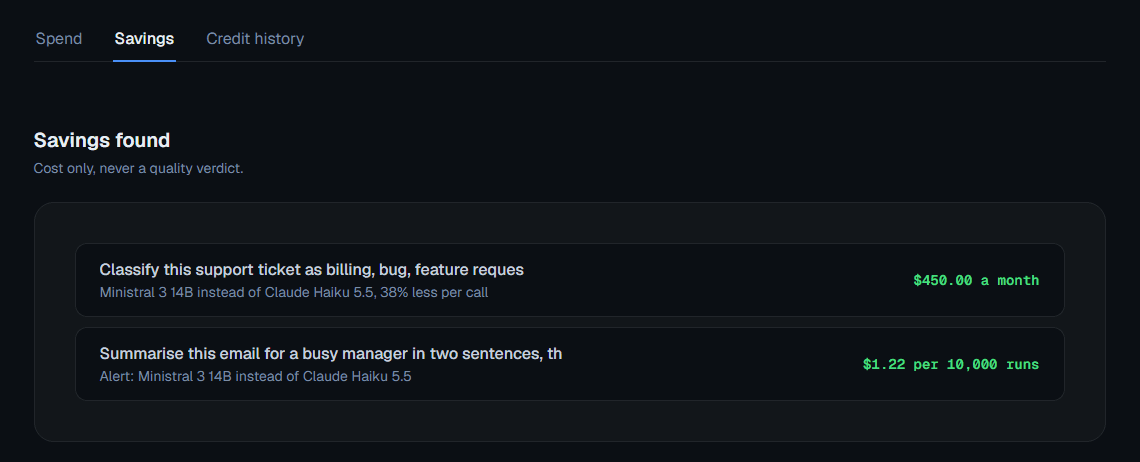
Tell it the model you use today and your monthly bill. It projects what each alternative would cost at the same call volume.
How it works in three steps
From your monthly bill to a projected one for every alternative.
Set your baseline
When you set up a test, tell it which model you use for that task today and roughly what your monthly bill for it is.
Run the test
Each model's cost for one call is measured on your real prompt.
Read the projection
Your bill and your current model's cost per call give your monthly calls. Each alternative's cost per call becomes a monthly bill at that volume.
What you get from a baseline
Dollars, not credits
A savings projection is about your real provider bill, so it is shown in dollars, unlike every other cost in the app.
Across a whole workflow
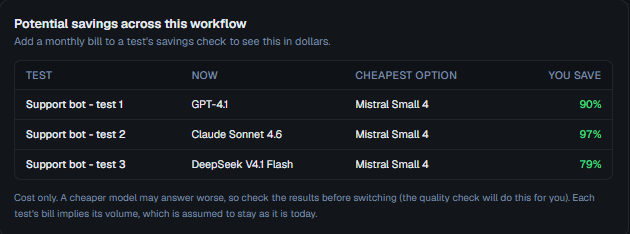
When several tests in a workflow have a baseline and a bill set, their savings add up into one figure for the workflow. A test without a baseline is left out, not guessed.
The details before you rely on it
The projection uses the costs your test already measured.

Cost only
It is a cost comparison, never a quality verdict. A cheaper model is not claimed to be as good, only cheaper at the same volume.

Pair it with a quality check
To see whether a cheaper alternative still holds up on your prompt, run a quality check on the same test.

Optional, per test
The baseline is optional. A test without one has no savings projection, and a workflow total leaves it out.

An estimate of your bill
The projection assumes the same call volume and each model's measured cost per call, so your real bill can differ.
Questions about the savings check
Anything else, write to us or book a demo.
Where do I see the cheapest model that passes?
Run a quality check on the test. Its Summary then shows the cheapest model whose answer passed and what it saves against the most expensive answer that passed.
Does the savings check say which model is better?
No. It only compares cost at the same call volume. Pair it with a quality check to see whether a cheaper model still holds up.
Why is it in dollars and not credits?
Because it projects your real provider bill, not what you spend on Test AI models.
Where do I enter my current model and bill?
When you set up a test. Both are optional.
Does it work for workflows?
Yes. When several tests in a workflow have a baseline set, their savings add up into one figure.

Find the cheaper model before your next invoice
- 10k free credits
- No card
- No API keys