Key takeaways
- Test AI models 2.0 is a full rebuild in code, live at app.testaimodels.com since the soft launch on 31 October.
- New in 2.0 are chat tests, a quality check that judges every answer against your own rule, Try cheaper models, workflows that keep their history, and alerts with a page of their own.
- Before a test runs, you see what it needs to start, in credits, and your balance moves once, when the run ends, by what the models really used.
- Pricing in 2.0 has a 10,000 credit signup gift, top-ups from $10, and PRO at $20 a month with 50,000 credits included every month.
At the Bubble × Contra AI hackathon in December 2025, a small app called LLM Bench won the Best Use of AI award and a $5,000 prize. It sent one prompt to models from OpenAI, Anthropic, Google, and xAI at once, and showed the output, speed, tokens, and cost of each answer side by side.
That app became Test AI models. Today, 2.0 is live at app.testaimodels.com, and it is not the same app. We rebuilt it from scratch, in code, and it has been open for sign-ups since the soft launch on 31 October.
This post covers why we rebuilt it, every new feature by group, what changed in credits and payments since v1, and what 2.0 does not do yet.
A comparison table was not enough
LLM Bench answered one question well: which model gives the best answer to this prompt, and what does it cost? From February to July 2026 we kept building on it in Bubble. We added workflows, benchmarks, image prompts, projects, and payments, one release at a time.
We saw real potential in it, and we spoke with investors about where it could go. To become a real intelligence platform, Test AI models needed many more features, and that meant moving from a no-code MVP to a full product in code.
So we rebuilt the whole app and kept the idea at its center. The rebuild made it safer, and it let us build the features below, which the no-code version could not hold.
What the rebuild changed under the hood
You will not see most of this, and that is the point. It is the base that lets the features below exist.
- Every account's data is walled off inside the database itself. Each table that holds your tests, prompts, and results has a rule in the database that only your workspace can read it. Every action on our servers also checks that you belong to the workspace before it touches anything.
- Your data is stored in the EU. The database runs in Frankfurt. The prompts you run still go to the providers of the models you pick, and Settings > Privacy shows which ones.
- Every model call is recorded once, with its real cost, tokens, and speed. Tests, chats, quality checks, workflows, and alerts all write to the same record. That record is what the cost numbers across the app come from.
- Every model call goes through one gate. It checks your balance and your plan before anything is sent, and it keeps each provider within its rate limits.
- Payments are tied to your account by our server. A purchase can no longer be credited to a different account, and a payment we cannot match is held for us to check by hand.
- Sign-in is safer. Changing your password or email address, or deleting your account, needs your current password.
- Product analytics are off until you say yes. A small banner asks first, and you can change your answer any time in Settings > Privacy.
A new test now fits on one screen
A new test starts with one choice, Compare or Chat. Then everything sits on one screen: your prompt, your models, and your options.
- Pick models from one panel. Search, then filter by Flagship, Cheap, Fast, Vision, or provider. Each model is one line, and opening it shows its price, limits, and reasoning setting.
- Use a file as your prompt. Upload a PDF, an image, or a Word, text, or Markdown file.
- Set the details only when you need them. System prompt, reasoning effort, max tokens, temperature, project, and test name are small buttons under the prompt.
- Run your first test in one click. A new account sees small examples on Home. One click opens the test with the prompt and the cheapest models already chosen.
- Nothing runs by accident. Run opens a confirmation with your prompt, models, settings, what the run needs to start, and your balance. Nothing is sent to a model until you confirm.
The catch: thinking models can spend all of your max tokens thinking and send no answer. The setup warns you before you run when the evidence says a model tends to do that.
Results are easier to read and compare
- Pin a model. Its column stays next to the labels while you scroll sideways through the others.
- Sort and switch in one toolbar. Sort by price, tokens, or speed, and switch text, costs, speed, and tokens on or off.
- Read an AI summary after every test. It is on by default, and you can switch it off in Settings > Privacy.
- Re-run one model inside the same test. Its new answer replaces the old one, and the earlier cost stays in your credit history.
- Pick a winner. The winner is always a thumbs up, and once a test has a winner, its answers stay as they are.
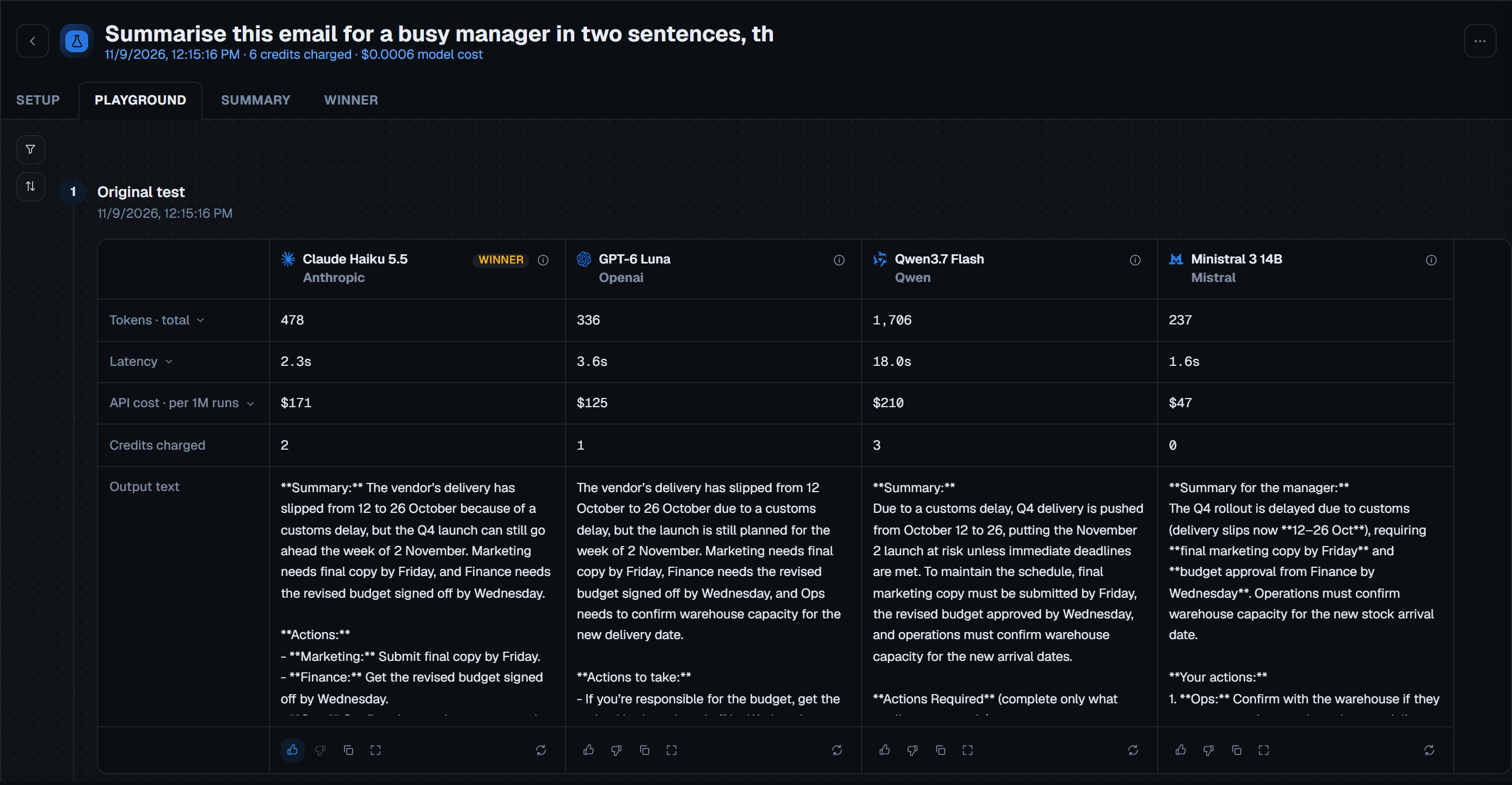
Chat with several models at once
A chat test sends one message to several models at the same time. Every reply sits side by side, so you can see how each model holds a longer conversation.
- Rate, copy, and ask again. Each reply has thumbs, a copy button, and Ask again. Ask again always shows the cost and asks before it runs.
- See the cost of the whole chat. The Stats tab shows messages, model cost, and credits spent.
The catch: every message re-sends the whole conversation to every model. From about 50,000 characters, the chat tells you it is getting long, and a message that would take it past 200,000 is refused.
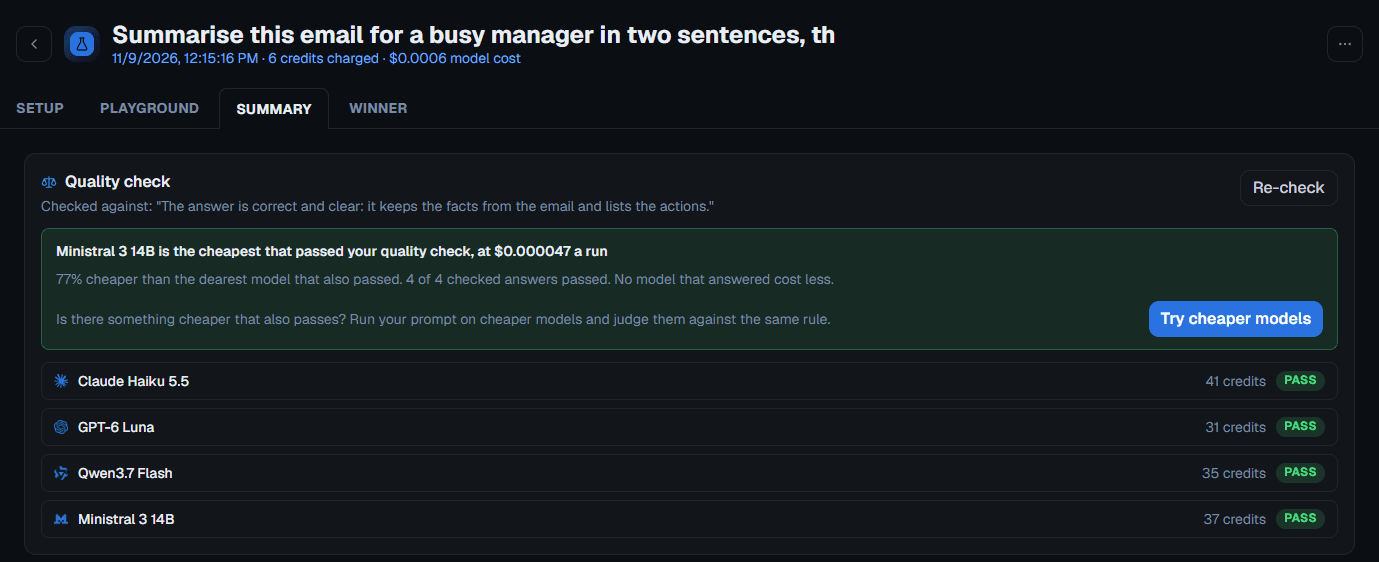
Every answer can be checked against your own rule
Our take: this is the feature the rebuild was for. You write a rule for what a good answer looks like, and judge models mark each answer against it. Our guide to writing a pass rule shows what a good rule looks like.
- Judges are never from the same company as the answer. An answer from a Claude model is never judged by a Claude model.
- Every answer gets pass, fail, or uncertain. When the judges reach no clear majority, the answer is marked uncertain instead of a guess.
- Find the cheapest answer that passed. The cheapest model that passed your rule gets a gold star and the words Cheapest pass.
- Try cheaper models. One button runs the same prompt on a few cheaper models you have not tried, and judges them by the same rule. You see the cost first, and it never runs on its own.
Workflows keep their history
A workflow is a set of tests that run together, so you can check all of your prompts in one press. Our guide to testing each step of a workflow shows how to set one up.
- Build it on one page. Add a new or existing test as each step, drag the steps into order, and set a spend cap.
- Import from n8n. Your n8n workflow file is read in your browser and is never uploaded.
- Every run compares like with like. Once a workflow has run, its tests are locked, so its history shows exactly what was run. Edit makes an editable copy.
- Open any run in the Playground. Four numbers across the top, a toolbar to pick a run and models, and one row per test.
Alerts tell you when a model changes
An alert re-runs a test or a workflow on a schedule and tells you what changed. Our guide to how alerts watch a test covers what each check looks at.
- Each alert has its own page. It shows what each check found, the baseline now and when you set it up, and a Check now button.
- One finding per line. A cheaper model that passes is green. A model that got slower, answers differently, or costs more is coral, with a warning icon.
- The bell keeps you posted. It tells you when a check finds something, when a check fails or is skipped, and each Monday which new models arrived.
- Alerts follow your plan. Pay as you go has 1 active alert on a test. PRO has up to 25, on tests and workflows. An alert uses credits only when a check runs.
Home, Analytics, Benchmarks, and Models were redesigned
- Home leads a new account through three Get started steps, then shows your recent tests, workflows, and alert findings.
- Analytics has three tabs: Spend, Savings, and Credit history, with this month compared to last month.
- Benchmarks gives every model a Score once it has 10 results: a winner is worth 3, a thumbs up 1, no rating 0, and a thumbs down -1.
- Models lists every model by provider, with prices per 1M tokens before markup, and a panel with each model's details.
- Notifications are grouped by day and stay unread until you mark them read.
You see what a run needs before it starts
The biggest change you will feel is that you always know what a run needs before it starts.
| v1 (July 2026) | 2.0 | |
|---|---|---|
| Starting out | 1 free test a day, up to 5 models | A 10,000 credit signup gift, any model |
| Pay as you go | Top-ups from $9, up to 10 models per test | Top-ups of $10, $30, or $100, up to 10 models per test |
| PRO | $19 a month, up to 20 models per test | $20 a month, 50,000 credits every month, up to 20 models per test |
| Markup | Lower on PRO | x3 on pay as you go, x1.5 on PRO, applied once when you buy credits |
| Before a run | A dollar estimate based on the average test | "Needed to start" in credits, worked out by the same check the run uses |
- Your balance moves once, when the run ends, by what the models really used.
- Credits never expire. That includes the monthly credits that come with PRO, even after you cancel.
- A slow model costs nothing. A run stops itself after about 4 minutes, and a model that is too slow is shown as failed and uses no credits.
- You can cancel PRO yourself in Settings > Billing. It ends at the end of the period you have paid for.
- Receipts are one click away. Settings > Billing opens Paddle's customer portal, already signed in, to download invoices and update your card.
The limits
2.0 is new, and some things are not there yet.
- Your account runs one test at a time. Starting a second one while the first is running tells you to wait.
- A run stops itself after about 4 minutes. That keeps a slow model from holding up your whole test.
- Images and PDF pages are capped at 30 MB per run.
- A quality check is a model judging a model. It follows your rule closely, and it says uncertain rather than guess, but it is still a model. Read the answers that matter.
Run your own test
A good way to see 2.0 is to run one of your real prompts on a few models and add a quality check. The signup gift covers your first tests.
- 10k free credits
- No card
Marko
P.S. Every change since 2.0 is listed in the app under Help > What's new, newest first.
Questions
What happened to the free daily test?
It is gone in 2.0. Every new account gets a 10,000 credit signup gift instead: 3,000 credits for confirming your email, 4,000 for your first test, and 3,000 for a short survey. You can use them on any model.
Do your credits expire?
No. Credits you buy never expire, and neither do the monthly credits that come with PRO. If you cancel PRO, the monthly credits you have not used stay in your account.
Why is "Needed to start" higher than what you pay?
It is what your balance must hold for the run to begin: our own estimate for the run, plus a 20% safety margin and extra room for models that think beyond your answer limit. Your balance is charged only for what the models really used, which is usually less.
Where can you see every change since 2.0?
In the app, under Help > What's new. Every release is listed there, newest first.

Runs Eterna Creative and built Test AI models after repeated multi-provider LLM integration work for client products.
About the team