Key takeaways
- A workflow is a saved set of up to 10 tests, one for each model-calling step you want to check.
- Steps do not pass answers to each other, because each step is its own test with its own prompt and models.
- Once a workflow has run, it is locked, so every run in its history compares like with like.
- You can import the model-calling steps of an n8n workflow, and Test AI models reads the file in your browser without uploading it.
A workflow in Test AI models is a saved set of up to 10 tests, one for each step of your product that calls a model. You run them together, see what each step costs and how fast it answers, and keep every run in one history. That shows you which steps can move to a cheaper model, and when one of them changes.
Many AI products and agents call a model at several steps: sort the request, pull out the details, write the reply. Each step is a separate model choice, and each one has its own cost. A workflow lets you check them all in one press.
| Step | What you do | What it gives you |
|---|---|---|
| 1. Build | Add a new or existing test for each model-calling step, up to 10 | One saved set of tests |
| 2. Import (optional) | Bring in the steps of an exported n8n workflow | Your prompts and models, ready to check |
| 3. Run | Set a spend cap and press Execute | Cost, speed, and answers for every step |
| 4. Compare | Run again later | What changed in each step since the last run |
| 5. Watch | Put an alert on the workflow | A check on a schedule |
Each step is its own test, not a link in a chain
Each step in a workflow has its own prompt, models, and settings. A workflow does not chain the steps or feed one step's answer into the next. It runs a set of tests as one unit and keeps their results together.
That makes it a way to test each step's model choice, not a way to run your pipeline end to end. If your reply step depends on what the sorting step returned, give the reply step a realistic example input in its own prompt.
Step 1 - Sort the request: "Sort this message into billing, bug, or question: ..."
Step 2 - Pull out the details: "Extract the order number and date from: ..."
Step 3 - Write the reply: "Write a short reply to this billing question: ..."
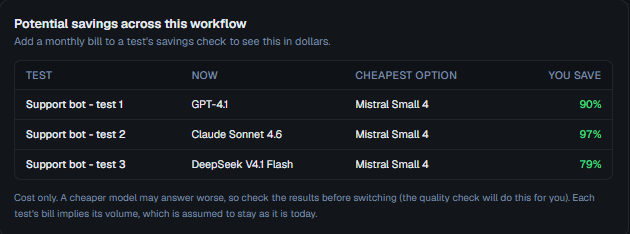
A workflow is built on one page
A workflow that has not run yet is built on one page: a title, a line of small buttons for the name, project, spend cap, and Import from n8n, then the steps.
- Add a step as a new test or an existing one. A new test uses the same prompt box and models panel as a new test on its own. An existing test links to its result, so it is never run or charged again.
- Every step needs something to run. A step needs a prompt and at least one model, or a picked test, before it can be saved.
- Change the order by dragging. Drag the handle, or focus it and press the up or down arrow key.
n8n steps can be imported without uploading the file
If your steps already live in n8n, you can import an exported n8n file. Test AI models reads the file in your browser and does not upload or store it.
- Only the model steps come in. The import takes the step prompts, models, and structure. It never reads credentials, it masks anything in a prompt that looks like a secret, and it does not run anything in the file.
- You check each step before saving. Each imported step lands in the normal form, so you can edit it first.
- Some prompts need a hand. Steps where an agent or chain node uses a separate model node, and plain HTTP calls to a provider, convert cleanly. A prompt built in a Set or Code node, or from an expression, is converted where possible, and you may need to paste it in yourself.
The whole run is checked against your cap before anything is billed
Before a workflow runs, the whole workflow is estimated up front, and the Execute card shows what it needs to start next to your spend cap.
- Nothing runs if the estimate is over your cap. The workflow does not charge the first few steps and then stop.
- Your balance must cover the whole run. The workflow's "Needed to start" figure is what your balance has to hold to begin.
- Each step is charged as it finishes. It appears in your Credit history as "Workflow step".
- Execute asks first. Nothing is sent to a model until you press the button in the confirmation.
The catch: a workflow run has the same time limit as a test, about 4 minutes for the whole run. A model that is too slow is shown as failed and uses no credits.
Every run compares like with like
Once a workflow has run, its tests are locked, so every run in its history shows exactly what was run.
- Edit makes a copy. It creates a new workflow with the same tests, spend cap, and project. The original and its runs stay as they are.
- Run again runs it all once more. It shows what the run needs to start before it begins.
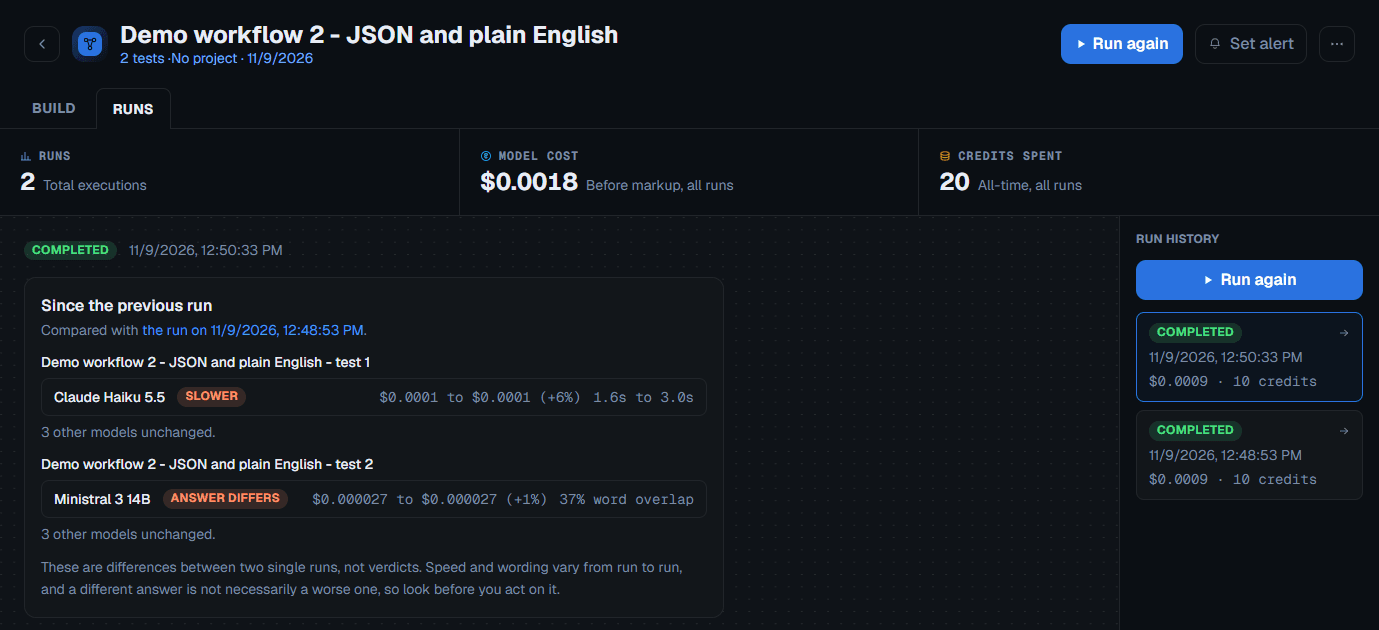
- Each run shows what changed. For every step, you see cost, speed, and whether the answer looks meaningfully different.
- Open any run in the Playground. It shows four numbers across the top, a toolbar to pick a run and models, and one row per test that opens into its table.
When not to use it: a step whose prompt changed, or that reuses an existing test, is skipped in the comparison, with the reason. To compare a changed prompt, run it as a new test.
An alert keeps the whole workflow checked
You can put an alert on a whole workflow, so it re-runs on a schedule and tells you when a step gets slower, costs more, or answers differently. Workflow alerts are part of PRO, which has up to 25 active alerts on tests and workflows. Pay as you go has 1 active alert, on a test.
Run your own test
Start with the step of your product that calls a model most often. Make it a test, then add the next step and turn them into a workflow.
- 10k free credits
- No card
Marko
P.S. If your steps already live in n8n, import the file first. It brings the model steps in at once, ready to check.
Questions
Can a workflow pass one step's answer to the next?
No. Each step is its own test with its own prompt. A workflow tests each step's model choice side by side, not the pipeline end to end.
What happens to an n8n file you import?
Test AI models reads it in your browser and does not upload or store it. The import never reads credentials and does not run anything in the file.
Why can't you edit a workflow after it ran?
So every run in its history compares like with like. Edit makes an editable copy, and the original keeps its history.
Does reusing a test you already ran cost credits again?
No. A step that reuses an existing test links to that result. It is never run or charged again.

Runs Eterna Creative and built Test AI models after repeated multi-provider LLM integration work for client products.
About the team