Key takeaways
- Your prompt goes to the company behind each model you pick, to get its answer.
- A few features send part of it to a model you did not pick: the task label, the quality check, and some helpers.
- Your tests are stored in the EU, in Frankfurt, until you delete them.
- Our privacy policy says we do not train models on your prompts, sell them, or show them publicly, and what each provider does with them is set by that provider's terms.
When you run a test in Test AI models, your prompt goes to the company behind each model you pick, so it can answer. A few features also send part of it to a model you did not pick. Your tests are stored in Frankfurt until you delete them, and Settings > Privacy in the app lists where your data goes.
Testing models means sending your prompt to other companies. Before you paste a production prompt, it helps to know exactly who receives it and what you can switch off.
| Where it goes | What is sent | When | Can you switch it off? |
|---|---|---|---|
| The models you pick | Prompt, system prompt, chat messages, attached image or document text | Every run | Pick different models |
| The task label | The start and end of the prompt, text only | Once per new test | No |
| Quality check judges | Prompt, pass rule, and answers | When you run a quality check | Do not run one |
| Helpers | The relevant prompt and answers | When you use them | The AI summary, in Settings > Privacy |
| Our database | Your tests, account, and files | Until you delete them | Delete a test, a workflow, or your account |
| Community benchmarks | Anonymous totals only | By default | Yes, in Settings > Privacy |
The models you pick receive your whole prompt
When you run a test, your prompt, system prompt, chat messages, and any attached image or document text go to the company behind each model you select: OpenAI, Anthropic, Google, xAI, Mistral AI, Moonshot AI, DeepSeek, Alibaba Cloud (Qwen), or Perplexity.
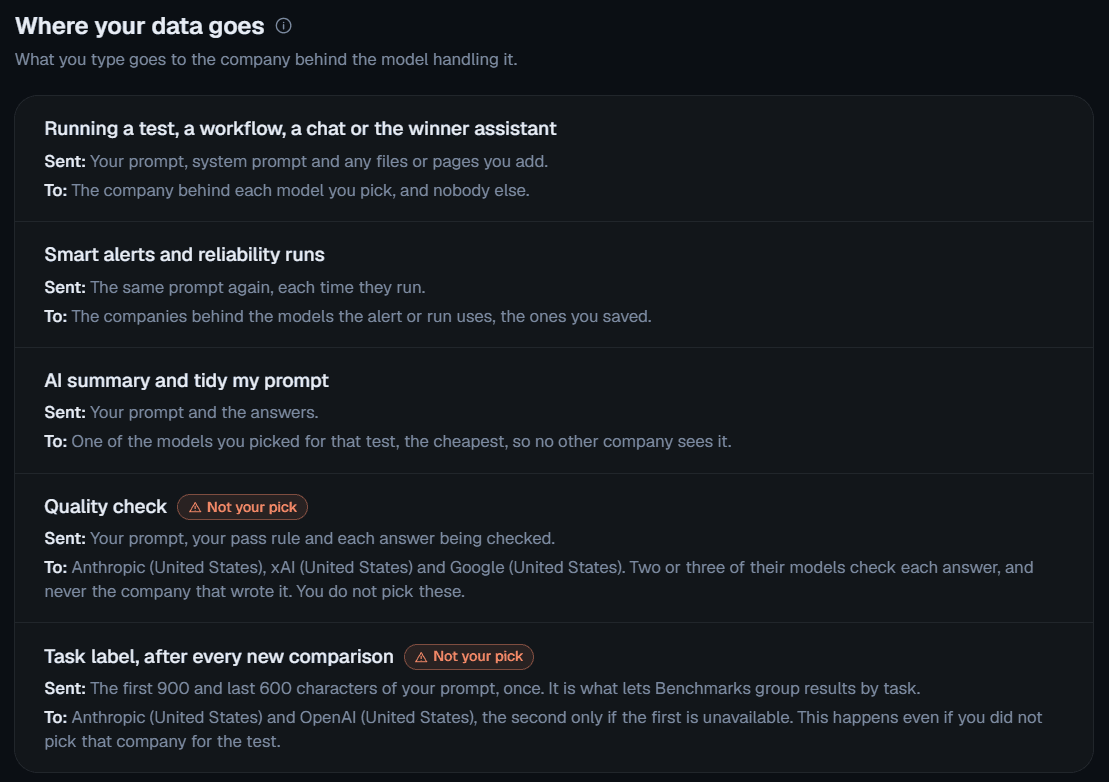
Some features use a model you did not pick
- The task label. When you start a new test, the start and end of its prompt are sent once to a small model that labels the kind of task, so Benchmarks can group results. A prompt of up to 1,500 characters is sent whole, and a longer one as its first 900 and last 600 characters. Only text is sent, never images. The model is Anthropic's Claude Haiku, with OpenAI's GPT-5.4 nano as the fallback, even when you did not pick either. It is charged like any other model call.
- The quality check. Judge models read your prompt, your pass rule, and the answers. A judge is never from the same company as the answer it judges, so it is often a company you did not pick.
- Helpers. The AI summary, prompt tidy-up, and the winner assistant send the relevant prompt and answers to the model they use. The AI summary uses the cheapest model you picked, and you can switch it off in Settings > Privacy.
Each provider's terms decide what it does with your prompt
Providers differ. Some keep data sent through their API for a period for abuse monitoring, some say they may use content to improve their services unless you have a separate agreement, and some store or process data outside the EU.
We do not control their terms. Read the terms of each provider you use, and do not send personal or sensitive data to a provider whose terms you have not reviewed.
When not to use it: if a prompt holds personal or sensitive data and you have not reviewed the terms of every provider you picked, take that data out first or leave those providers out.
We store your tests in Frankfurt until you delete them
- Where: your database, account, and files are hosted on Supabase in Frankfurt, Germany.
- How long: test results and prompts are kept until you delete them. Nothing is deleted automatically.
- How to delete: you can delete a test, a workflow, or your whole account at any time. Copies may stay in database backups until those expire in the normal backup cycle.
Our privacy policy sets three limits on us
Our privacy policy says that we:
- do not use your prompts or results to train or fine-tune AI models;
- do not sell your data or share it with advertisers;
- never show your exact prompts publicly.
Community benchmarks use anonymous totals, and you can opt out
By default, your tests count toward the community numbers on Benchmarks, in the app and on its public page, as anonymous totals: anonymized task types and winner picks. No prompts, answers, names, or organization details are shown.
You can turn this off at any time in Settings > Privacy:
Settings > Privacy > Share my test results for community benchmarks: Off
Three checks before you paste a production prompt
- Take out personal data you do not need for the test.
- Read the terms of the providers you are about to pick.
- Decide on the defaults: whether you want the AI summary on, and whether your tests should count toward the community numbers.
Run your own test
Start with a prompt that has no personal data in it, pick the providers whose terms you have read, and check Settings > Privacy before you run.
- 10k free credits
- No card
Marko
P.S. Settings > Privacy in the app always shows the current list of where your data goes.
Questions
Does Test AI models train on your prompts?
Our privacy policy says we do not use your prompts or results to train or fine-tune AI models. What each provider does with data sent through its API is set by its own terms.
Is your prompt sent to providers you did not pick?
Partly. The task label, the quality check judges, and the helpers can use a model from a company you did not pick. The task label sends only the start and end of the prompt, as text.
Where is your data stored?
On Supabase in Frankfurt, Germany, until you delete it.
Can you keep your tests out of the community numbers?
Yes. Turn off "Share my test results for community benchmarks" in Settings > Privacy at any time.

Runs Eterna Creative and built Test AI models after repeated multi-provider LLM integration work for client products.
About the team